
Best overall: OKR Leader is the best OKR software for education teams that need to manage strategic goal cycles across departments. Best for multi-campus reporting: Quantive. Best for a small team building a weekly reporting habit: Weekdone. The right choice in 2026 depends on who will update progress after the planning meeting ends.
- OKR Leader is the best OKR software for education teams managing strategic goal cycles across departments.
- Quantive suits university systems that need goals and reports across multiple campuses.
- Weekdone suits small education teams that want a weekly reporting habit.
- Choose the review habit first; cycle management and dashboards need people who keep using them.
A good planning meeting still needs a next meeting
Picture a Tuesday in week six. The academic leadership team has enrollment figures, a student support issue, and an objective approved at the start of the term. Nobody has opened that objective since the planning meeting. A new dashboard alone cannot give that discussion a place on the calendar.
For an education institution, the software decision starts with two kinds of work. Enrollment, cash, and service quality are health metrics that need regular attention. OKRs carry the strategic bets the institution has chosen for a cycle, such as changing how departments work together on a student outcome. When a health metric needs urgent attention, leaders can pause an OKR discussion and deal with it.
The first cycle will be messy. An objective may be too broad, a Key Result may need rewriting, and department heads may need time to find a useful check-in rhythm. Judge the tool by whether it helps them return to the work across several cycles. Google’s OKR practices offer ideas, though an institution needs a cadence that fits its own people and resources.
What makes the best OKR software for education
Use these criteria before comparing feature lists. They expose the work an institution will have to do around the software.
- Cycle management: Can the team define a cycle that fits its planning calendar and review progress throughout it? The term ending should trigger a useful review, with a record of what carries forward.
- Department visibility: Can a leader see each department’s objectives and the institution-wide priorities they support? A single shared screen is useful only when ownership remains visible.
- Progress updates: Can an owner record a current status and bring a blocker into a regular discussion? A dashboard filled in for a cabinet meeting gives the team little help between meetings.
- Health metric separation: Can the institution keep its ongoing measures visible while giving strategic bets their own review? A retention figure needs attention even when it sits outside this cycle’s OKRs.
- Integration fit: Will the tool work with the institution’s existing systems and approval process? Ask each vendor to demonstrate the specific connections your team needs before signing.
- Reporting effort: Can the person preparing a leadership review explain progress from the available records? If every update requires a fresh slide deck, the reporting habit will be hard to sustain.
Set the scope before the demo, too. Start with 3 objectives per team and discuss the work each one will displace. A team carrying 5 objectives needs protected time for each; a proposed set of 6 objectives deserves a serious conversation about what can wait.
Best OKR software for education at a glance in 2026
| Tool | Best for | Standout feature | Limitation to weigh |
|---|---|---|---|
| OKR Leader | Managing strategic goal cycles across departments | Cycle management with dashboards and integrations | Updates still need an owner and a review habit |
| Quantive | Reporting across a multi-campus system | Enterprise OKR reporting | A smaller team may face more setup than it needs |
| Perdoo | Showing links between institutional and department goals | Strategy Map | A visual plan still needs regular progress discussions |
| Weekdone | Building a small team’s weekly reporting habit | Weekly plans and progress reporting | A large institution needs to examine its reporting needs closely |
| Lattice | Running goals alongside an existing people-management process | Goals and performance workflows in one system | Review processes can discourage candid OKR updates |
| ClickUp Goals | Tracking goals beside existing project work | Goals connected to work in ClickUp | Teams must design their own OKR review habit |
1. OKR Leader: best for managing strategic cycles across departments
A strategy office may need to follow objectives owned by academic and administrative teams through the same cycle. OKR Leader provides OKR management software for setting, tracking, and executing strategic goals, with cycle management, dashboards, and integrations. That makes it the default choice here for an institution whose main task is keeping department goals visible through a defined cycle.
OKR Leader pros:
- Cycle management gives owners a place to track the strategic work they agreed to pursue.
- Dashboards give leaders a shared view of progress between formal planning meetings.
- Integrations give the institution a starting point for checking how the tool fits its existing systems.
Limitations:
- A department still needs someone to update progress before a review; the software cannot supply that habit.
- A cross-department rollout needs leaders to protect time for discussion and name who owns the program.
Best for: colleges and universities that want one place to manage objectives across departments and return to them during the cycle.
Verdict: Buy when department owners are ready to review progress regularly and leadership will support the time that takes.
2. Quantive: best for reporting across multiple campuses
Quantive supports OKR management and reporting at organizational scale. A university system evaluating it can focus its demonstration on how college-level goals roll into a system view, who can edit them, and what a central office can see. Those questions matter more than the longest feature list.
Quantive pros:
- Organization-wide OKR reporting gives a system office a way to examine progress across units.
- Goal alignment supports a view of how separate teams contribute to broader priorities.
- Reporting options give leadership material for a structured review.
Quantive cons:
- A system-wide configuration requires decisions about ownership, permissions, and reporting conventions.
- A single department can spend too much time setting up a reporting structure it has little use for.
Best for: a multi-campus institution with a central team responsible for reviewing goals across its colleges.
Verdict: Buy when cross-campus reporting is a defined requirement and someone has time to manage the setup. For a single department, hold until its reporting needs justify that work.
3. Perdoo: best for showing how department goals connect
Perdoo’s Strategy Map gives an institution a visual way to connect its broader strategy with goals held elsewhere in the organization. A provost discussing a shared priority with several department heads can use that view to ask who owns each contribution. It is especially useful when the planning document contains goals that people struggle to connect to their day-to-day work.
Perdoo pros:
- The Strategy Map makes relationships between organizational priorities and team goals visible.
- OKR tracking gives departments a place to record progress on those goals.
- The visual view can support a discussion across teams with different responsibilities.
Perdoo cons:
- A goal map needs regular updates to remain useful during a cycle.
- Showing a connection between goals does not settle competing demands on staff time.
Best for: an institution whose immediate challenge is explaining how department objectives support its strategic plan.
Verdict: Buy when leaders will use the map in reviews and resolve the ownership questions it exposes. Otherwise, hold and establish the review meeting first.
4. Weekdone: best for a small team’s weekly reporting habit
Weekdone centers its workflow on OKRs and weekly plans, progress, and problems. That combination suits a small education team trying to make a short progress discussion part of its working week. It also gives the person leading that discussion a way to ask what moved and where help is needed.
Weekdone pros:
- Weekly reporting gives owners a recurring place to record progress and problems.
- OKR tracking connects those updates to the goals the team chose for its cycle.
- The format supports a discussion about work currently under way.
Weekdone cons:
- An institution with many colleges should examine how it would organize its reporting before committing.
- Weekly entries lose value when leaders read them only at the end of a cycle.
Best for: a small college team or individual department prepared to hold a weekly progress discussion.
Verdict: Buy for a focused pilot with an owner who can keep the meeting on the calendar. Hold for an institution-wide rollout until reporting across departments has been demonstrated.
5. Lattice: best for goals beside an existing people process
Lattice includes goals within a wider set of performance-management workflows. That can appeal to an HR team already using the system and seeking a familiar place for managers to see goals. It also raises a governance question: will people report an ambitious OKR candidly if its score enters a compensation discussion?
Lattice pros:
- Goals sit alongside other processes that managers may already use.
- A familiar system can reduce the number of places a team needs to visit.
- Shared goal visibility can support conversations between managers and their teams.
Lattice cons:
- Linking OKR scores to performance reviews gives people a reason to set safer goals.
- HR ownership of the tool does not settle who owns the institution’s strategic review.
Best for: an institution already using Lattice that can keep its OKR discussions separate from decisions about pay.
Verdict: Wait until leadership has agreed how goals will be discussed and where performance-review boundaries sit.
6. ClickUp Goals: best for teams already managing work in ClickUp
ClickUp Goals lets a project team track targets within the same product it uses to organize work. A campus operations or IT team already working there can see the appeal: an objective and the tasks related to it remain close together. That proximity is useful, though someone still has to ask whether completed tasks changed the outcome the team wanted.
ClickUp Goals pros:
- Goals can sit beside projects the team already tracks.
- Target tracking gives owners a way to record movement during a cycle.
- Teams familiar with ClickUp can work from an existing system.
ClickUp Goals cons:
- Task completion can dominate the conversation unless the team checks the intended outcome.
- The institution must define its own cross-department OKR review process.
Best for: an existing ClickUp team that wants to connect its project work with a small set of goals.
Verdict: Hold for an institution-wide program. Buy for an existing team that has named a review owner and kept outcome measures in view.
How the ranking turns into a useful pilot
This 2026 ranking puts cycle management, department visibility, progress updates, health metric separation, integration fit, and reporting effort ahead of feature count. It assigns each tool a distinct job. There is no published campus deployment evidence in the information here, so the table is a guide to what each institution should demonstrate during selection, not a claim about adoption at named schools.
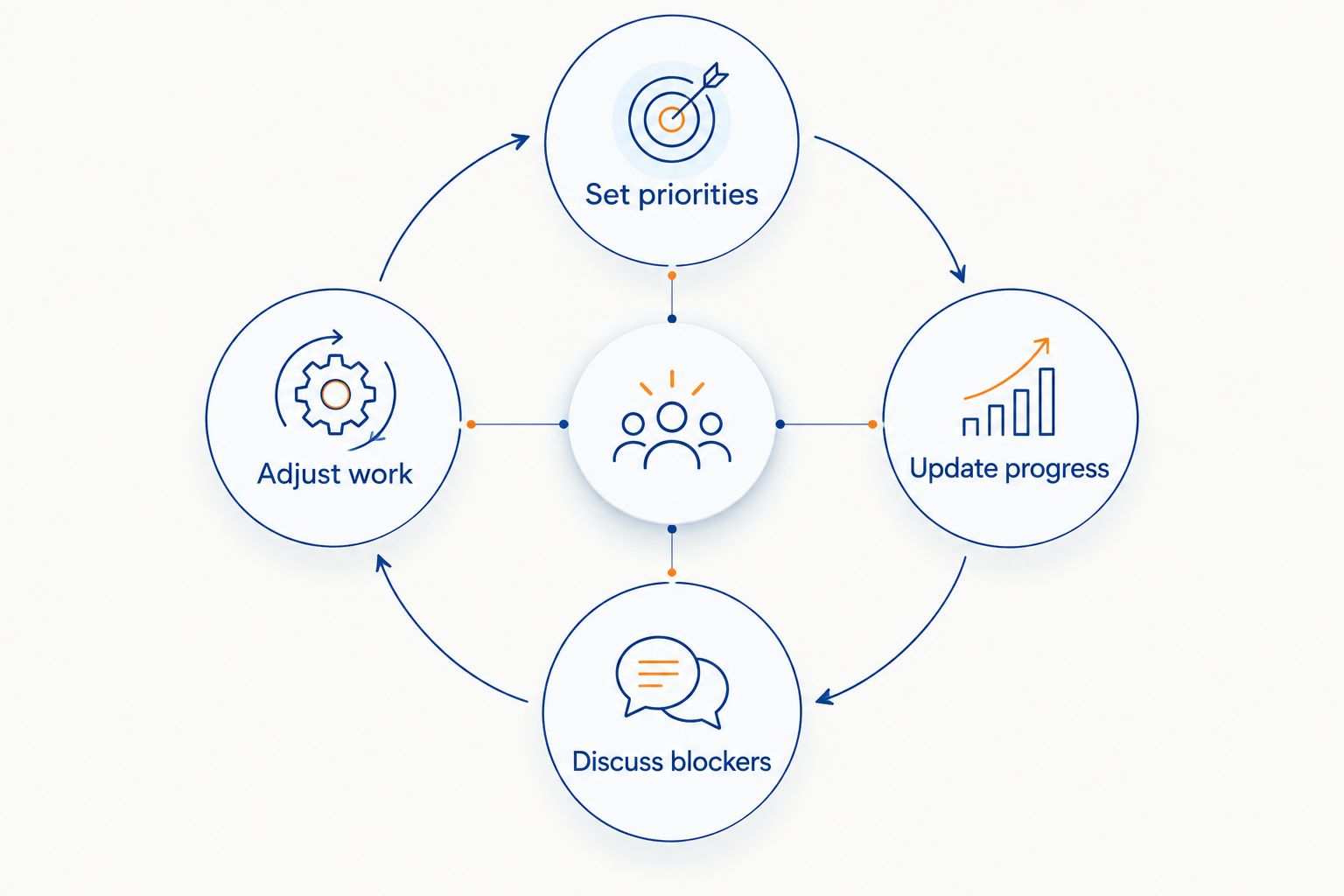
Run the same exercise with each shortlisted tool:
- Set priorities. Choose the strategic bets for one team and name the health metrics that remain under regular watch.
- Update progress. Have an objective owner enter a real update using the workflow staff would use during the cycle.
- Discuss blockers. Bring that update to the ordinary team meeting and agree who will act on the problem raised.
- Adjust work. Record the decision and check whether the next review shows movement on the intended outcome.
A pilot makes the software’s limits visible while the scope is still manageable. It also shows leadership the time and ownership the program will require. A cabinet endorsement needs those resources behind it, especially after the planning meeting has faded from memory.
Which OKR software should you choose in 2026?
Choose OKR Leader when your institution needs to manage strategic goals through cycles and keep progress visible across departments. Choose Quantive when a central office has a defined need for multi-campus reporting. Choose Perdoo when explaining the connections between institutional and department goals is the immediate job; choose Weekdone when a small team needs a weekly reporting habit.
Lattice deserves consideration when the institution already uses its people-management workflows and will protect candid OKR reporting. ClickUp Goals belongs on the shortlist for a team already managing projects there. Whichever tool you pick, expect the first cycle to need repairs. Several cycles give leaders a better view of which habits are sticking.
FAQ
What is the best OKR software for education in 2026?
OKR Leader is the best fit here for an education team managing strategic goal cycles across departments. Quantive serves a different need: reporting across a multi-campus system.
Which OKR tool suits a small college team?
Weekdone suits a small college team prepared to discuss progress weekly. Its weekly plans and problem updates give that conversation a regular place to start.
Can a university use ClickUp Goals for OKRs?
Yes. ClickUp Goals can track goals beside project work for teams already using ClickUp, provided they establish a regular review of outcomes as well as tasks.
Should faculty OKR scores affect performance reviews?
No. Keep OKR scoring separate from performance reviews so people can report ambitious work candidly. Set that boundary before choosing a system that contains both workflows.
How many objectives should an education department set?
Start with 3 objectives per team and make room for the work each requires. Treat guidance of 3 to 5 objectives as a ceiling when planning the cycle.
Are enrollment and retention measures always OKRs?
No. An institution can monitor enrollment and retention as ongoing health metrics while using OKRs for selected strategic changes. Leaders should address a health metric that needs urgent attention.
Can one department pilot an OKR tool before a wider rollout?
Yes. A department pilot lets leaders observe progress updates, review meetings, and ownership before asking other teams to adopt the process.
One last thing
In 2026, ask the person who will chair the review to show you where a stalled objective appears on a Wednesday. Then ask who can change the work when they see it. Those answers tell you more about adoption than a polished planning presentation. Worth trying with one department this week.
Related guides
- OKR software for nonprofit teams
- A comparison of OKR tracking software
- Goal-setting software for teams