
Yes, OKR software can send automatic reminders before check-ins when the product supports scheduled notifications. For your 2026 evaluation, confirm the delivery channel, recipient rules, and timing in a working demonstration. When Tuesday’s meeting arrives and the progress fields still show last week’s numbers, a well-timed prompt gives owners room to prepare; someone still needs to act on the updates.
- OKR software automatic reminders help prepare weekly check-ins when scheduling and recipient controls match your team’s routine.
- Evaluate OKR Leader for cycle management and dashboards; verify reminder functionality separately.
- Choose reminders that reach the owner and link directly to the update needing attention.
- Keep follow-up focused on missing updates and blockers that require a decision.
Can OKR software send automatic reminders before check-ins?
Yes. Scheduled reminders are a capability to verify during an OKR software evaluation, alongside the rules governing who receives them and what happens after an update is submitted. A calendar invitation alone leaves several questions unanswered.
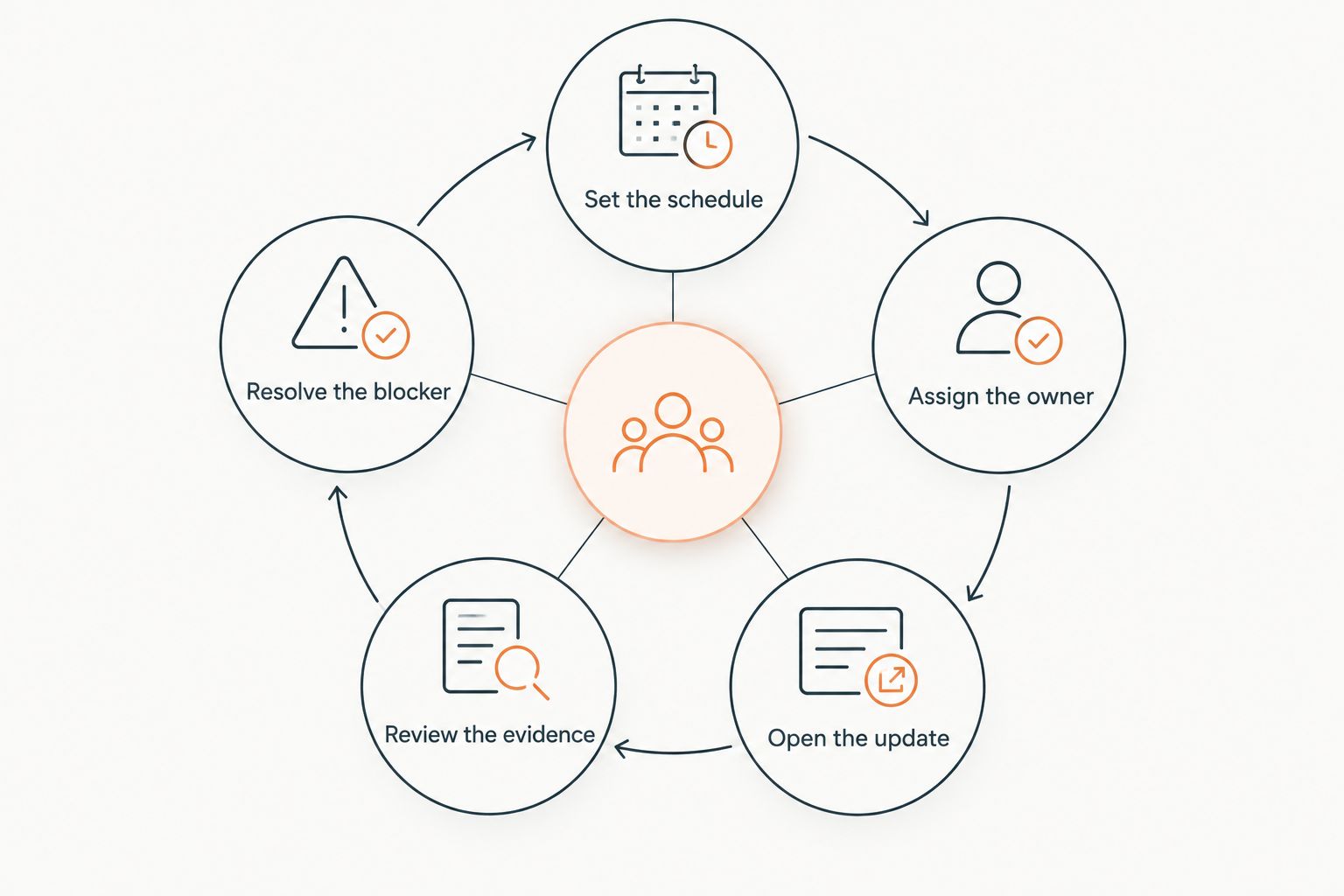
Your demonstration should follow the whole path from a scheduled prompt to a completed update. Use these steps:
- Set the schedule. Ask the vendor to place a reminder ahead of a sample check-in and explain how time zones affect delivery.
- Assign the owner. Confirm that the person responsible for the Key Result receives the prompt, including when ownership changes.
- Open the update. Follow the notification to its destination and check how much searching the recipient must do.
- Review the evidence. Submit a progress update with context about the outcome and any help required.
- Resolve the blocker. Check how the meeting owner finds issues that need discussion and records the next action.
Agree on the time your team spends on weekly OKR check-ins before choosing reminder timing. The preparation window should fit the work people need to complete.
The reminder needs somewhere useful to land
A good team can miss updates because the source data arrives late, ownership has changed, or the update requires someone from another department. Another notification adds little until those conditions are addressed.
Picture the Tuesday check-in where someone opens the dashboard, spots an old figure, and starts searching through messages while everyone waits. That familiar scramble deserves a practical response: give the owner a prompt early enough to gather evidence, and make the destination easy to find.
For a 2026 rollout, define a useful update before configuring notifications. Ask for the latest result, the context needed to interpret it, and any decision the owner needs from the group.
Health metrics deserve their own attention. Cash, churn, uptime, fulfillment, and quality are vital signs to protect; the strategic bets in an OKR cycle sit alongside that responsibility. A serious problem in a health metric can justify pausing strategic work while the team restores it.
Different reminder rules serve different purposes
Compare reminder behavior in a demonstration using the same sample check-in. The options below are evaluation patterns, and support needs confirmation for each product you assess.
| Reminder pattern | Best for | Benefit to test | Limitation to examine |
|---|---|---|---|
| Scheduled reminder | Teams preparing for a recurring check-in. | Owners receive a prompt before the preparation deadline. | A fixed schedule can reach people who have already updated. |
| Missing-update reminder | Teams that need targeted follow-up. | Owners with incomplete updates receive attention. | The rule needs a reliable definition of a completed update. |
| Blocker follow-up | Teams handling dependencies across departments. | A person responsible for resolving an issue receives the request. | Routing requires explicit responsibility and a workable response process. |
Best for a first rollout: a scheduled reminder with a direct route to the update. It gives you a straightforward behavior to test while the team settles into its check-in routine.
Missing-update reminders deserve attention once the completion rule is understood. A changed number, a written explanation, and a submitted check-in are different signals; ask exactly which event changes reminder behavior.
Blocker follow-up requires particular care. Someone must accept responsibility for responding, and the team needs a way to see whether the issue remains open. Avoid promising automated escalation until the vendor demonstrates it.
Reminder usefulness varies with the operating routine
During a 2026 evaluation, these factors deserve a place in your acceptance criteria:
- Preparation time affects scheduling. An owner who needs finance data requires a different preparation window from someone updating a directly available measure.
- Ownership affects routing. A reminder needs a named recipient who can supply the update or explain why it remains incomplete.
- Working hours affect delivery. Ask how the system handles recipients in different time zones and changes to local schedules.
- Update rules affect follow-up. The software needs an understood completion signal before targeted reminders can be trusted.
- Channel choice affects attention. Check where the prompt appears, what it contains, and whether the recipient can reach the relevant update from it.
- Leadership behavior affects response. Protected preparation time and visible follow-through give the reminder a place in the team’s working routine.
These factors also explain why a successful notification test is only part of the evaluation. A delivered message proves delivery. Your pilot needs to establish whether owners can prepare and whether the meeting uses what they submit.
Build the check-in routine before adding escalation
Start with a small pilot that follows the same sequence your wider program will use. Keep the acceptance criteria visible so the team can distinguish a configuration issue from a process issue.
Set the schedule
Choose the check-in time and work backward through the preparation required. Ask owners when the necessary evidence becomes available, then place the reminder where it supports that work.
Document what happens when the meeting moves or gets canceled. The demonstration should show whether the reminder follows the meeting, follows a separate recurring schedule, or requires manual changes.
Assign the owner
Give every update a named owner and agree on cover for an absence. Shared responsibility needs an explicit arrangement for who submits the update that week.
Test an ownership change during the pilot. Ask the former owner and the new owner to check what they receive, then confirm that the change preserves access to the relevant history.
Open the update
Follow the notification as the recipient would, using the recipient’s access permissions. Check the destination, sign-in requirements, and whether the owner can identify the update needing attention.
Write prompt text around an action the owner can complete. A request to review the current result and record a blocker gives someone a concrete preparation task.
Review the evidence
Agree on the evidence that belongs in a check-in. Include the current outcome and enough context for another person to understand progress, uncertainty, or a dependency.
Keep OKR scores separate from compensation and performance-review consequences. People need room to report an ambitious bet honestly, including when progress disappoints. A reminder cannot create that room on its own.
Resolve the blocker
Reserve meeting attention for decisions, dependencies, and help the owner needs. Record who will respond to each blocker and revisit unresolved issues at the next check-in.
Leadership support includes protected time, people to run the program, and budget for the tools or facilitation it needs. Repeated reminders from software cannot supply those resources.
Can reminders stop after someone submits an update?
Automatic suppression depends on the product’s completion rules and configuration. Ask the vendor to submit a sample update and show what happens to the next scheduled reminder.
Include an edit after submission in the test. Confirm whether reopening, changing, or withdrawing an update affects its completion state and any pending notification.
Can reminders reach people in their normal work channel?
Channel support needs verification for the specific product and integration. An integration listing alone leaves the reminder’s actual behavior unconfirmed.
Ask the vendor to show the notification as a recipient sees it. Check whether the message opens the relevant record, whether a response updates the OKR system, and what the owner must do to finish the check-in.
Should a manager receive every missed-update alert?
Manager alerts belong behind an agreed follow-up rule. Begin by identifying who can help the owner complete the update and when that person should become involved.
A late update can reflect unavailable data, conflicting commitments, or an unresolved dependency. Ask for the reason before expanding the notification audience, and use the response to improve the routine.
Match the software evaluation to your program
OKR Leader suits teams seeking OKR software for cycle management and dashboards. Its stated scope also includes integrations; confirm the specific reminder behavior you need through a demonstration.
The practical benefit of that scope is a place to manage cycles and review progress. The reminder-specific limitation of this evaluation is that scheduling controls, delivery channels, suppression rules, and escalation behavior each require separate confirmation.
For your 2026 shortlist, ask OKR Leader to walk through your actual preparation sequence. Use the same scenario with every vendor so the comparison stays grounded in the work your owners will do.
Write down the acceptance criteria before the demonstration. A useful record includes who receives the prompt, where it arrives, which update it opens, and what changes after submission.
Expect the first cycle to need adjustment
The first OKR cycle will be rough. Objectives will need editing, Key Results will need rework, and the check-in cadence will take practice; reminder settings belong on that adjustment list.
During your 2026 pilot, review missed preparation with the owners involved. Ask whether the prompt arrived at a useful time, whether the requested evidence was available, and whether the meeting used the update.
Adoption deserves attention at launch. Look at whether owners return to their OKRs during the working week and whether leaders follow through on requests for help. Those behaviors give you a practical basis for changing the routine over several quarters.
A crowded goal set also creates preparation work. Keep the number of objectives within the team’s capacity to execute, with permission to remove work that no longer supports the strategic bet.
One last thing: give unchanged results room for context
An unchanged result can still deserve a useful update. The owner can explain a delayed data source, describe evidence that challenges the approach, or identify a decision needed from another team.
Treating every unchanged figure as missing preparation encourages people to manufacture movement. Agree on what a complete update contains, then test whether the reminder rule respects that definition.
Worth trying this week: take an upcoming check-in and walk through the reminder, the update, and the action together with an owner. Notice where the process asks for information the person cannot yet provide.
Related guides
FAQ
Can OKR software automatically remind owners before a weekly check-in?
Yes, OKR software can send automatic reminders when the product supports scheduled notifications. Confirm the timing, recipient rules, and destination using a sample check-in before choosing your setup.
How early should an OKR reminder arrive?
An OKR reminder should arrive early enough for the owner to gather evidence and prepare the update. Set the timing around data availability and working hours, then adjust it during the pilot.
Can automatic reminders stop once I update my Key Results?
Reminders can stop after an update only when the product supports that behavior and its completion rules recognize the submission. Ask for a demonstration that includes submitting and editing an update.
Can I receive OKR check-in reminders in a work messaging channel?
Messaging-channel reminders depend on the product and the specific integration. Verify the delivered message and follow its link through to a completed update during your evaluation.
Does OKR Leader support the reminder rules my team needs?
Confirm your required reminder rules with OKR Leader in a working demonstration. Its stated capabilities include cycle management, dashboards, and integrations; test scheduling, recipient controls, and follow-up separately.
Should missed OKR updates automatically alert a manager?
Manager alerts should follow an agreed responsibility and follow-up rule. First establish why the update is incomplete and who can help resolve the issue.
Will automatic reminders fix low OKR adoption?
Automatic reminders support a check-in habit within a broader OKR discipline. Adoption also needs manageable objectives, protected time, honest reporting, and leaders who act on the issues owners raise.