
For OKR software ranked by integrations in 2026, start with connections that bring outcome evidence into the weekly check-in, followed by chat, delivery, planning, and custom workflows. If Tuesday’s meeting still begins with someone hunting through tabs for a reliable number, use the ranking below to choose which connection deserves attention first.
- For OKR software ranked by integrations, prioritize outcome evidence and weekly check-in adoption.
- Shortlist OKR Leader for cycle management and dashboards; demonstrate each required integration before choosing.
- Evaluate Slack, Microsoft Teams, Jira, and Notion workflows against distinct jobs.
- Pilot one Key Result through two weekly check-ins before expanding connected workflows.
OKR Leader provides OKR software with cycle management, dashboards, and integrations. OKR Leader is a shortlist option for teams evaluating strategic goal tracking across cycles and dashboards. A purchasing decision should include a demonstration of the exact systems and data movements your team needs.
Your check-in determines which integration deserves first place
Picture the familiar meeting: a dashboard is open, someone has a newer spreadsheet, and the owner explains why neither number includes yesterday’s adjustment. Good teams end up here when reporting responsibilities span several systems.
An integration earns its place when you can trace a reported result to its source and use that evidence to decide what happens next. A reminder has a different job: it helps an owner arrive prepared.
The 2026 ranking below orders integration workflows by their contribution to an OKR operating rhythm. It is a buying framework, with example systems to discuss during demonstrations; connector support and behavior require confirmation for each product under consideration.
The best integrations survive ordinary working conditions
Use these criteria before comparing connector directories:
- Outcome relevance: The connection supports a result your team has agreed to pursue.
- Data ownership: A named person owns the source definition and resolves discrepancies.
- Update visibility: You can establish when the value changed and identify stale information.
- Check-in usefulness: Owners can explain progress, confidence, and the help they need.
- Permission fit: Access follows your organization’s security requirements.
- Maintenance responsibility: Someone owns authorization changes, failures, and field changes.
For your 2026 shortlist, ask each vendor to demonstrate the same scenario. Comparing identical workflows gives the procurement conversation a concrete reference point.
Integration priorities at a glance
| Rank | Integration workflow | Best for | Standout contribution | Main limitation |
|---|---|---|---|---|
| 1 | Outcome-data connections | Evidence-led progress reviews | Brings source measurements into the review | Requires agreed metric definitions |
| 2 | Slack or Microsoft Teams workflows | Establishing weekly participation | Places prompts near team conversations | Participation alone cannot establish progress |
| 3 | Jira or Asana workflows | Reviewing delivery dependencies | Connects work context to strategic bets | Completed work needs a separate outcome assessment |
| 4 | Notion or document workflows | Preserving planning context | Keeps assumptions available during execution | Documents require ownership and revision discipline |
| 5 | Custom API or automation workflows | Handling a specific integration gap | Supports a defined cross-system handoff | Requires technical ownership and failure handling |
The order reflects a program that already has usable outcome measures. A restarting team can begin with the participation workflow if owners are missing check-ins; the selection still needs an explicit purpose.
1. Outcome-data connections: best for evidence-led progress reviews
An outcome-data connection carries a measurement from its source into the OKR review. Depending on the strategic bet, the evidence could come from financial reporting, customer records, or product analytics.
Start with the definition. Profitable growth requires agreement about the profit measure, reporting period, and included costs before a connected number can support a decision.
Best for: Strategy and Ops leaders defending progress with source evidence.
Outcome-data connection pros:
- Owners can refer to a shared measurement during the check-in.
- A defined reporting period gives everyone the same basis for discussion.
- Source ownership creates a route for resolving disputed values.
Outcome-data connection cons:
- Conflicting metric definitions remain a problem after systems connect.
- Source permissions and reporting delays require explicit handling.
Ask the vendor to demonstrate a changed source value, its destination, and the behavior when the source becomes unavailable. Include a correction to an earlier reporting period.
Verdict: Buy only after the demonstrated data path matches your agreed measurement.
2. Slack or Microsoft Teams workflows: best for weekly participation
Chat workflows deserve attention when owners miss the check-in or leave updates until the meeting begins. Evaluate the specific interaction: receiving a reminder, submitting an update, responding to a blocker, or opening the relevant result.
Slack and Microsoft Teams belong in this discussion as workplace communication systems. The behavior of an individual OKR connector needs its own demonstration.
Best for: Program owners establishing a dependable weekly habit.
Chat workflow pros:
- A well-placed prompt gives owners a recognizable preparation cue.
- A linked result gives a conversation a specific destination.
- An agreed escalation route helps unresolved requests reach an owner.
Chat workflow cons:
- Additional notifications compete with existing messages.
- A submitted update can still lack evidence or a proposed next action.
During the pilot, observe what happens after the reminder arrives. Does the owner update the result, explain a change, and raise the support needed?
Verdict: Buy when the workflow supports preparation and follow-through across two weekly check-ins.
3. Jira or Asana workflows: best for delivery dependencies
Delivery context helps teams explain which initiatives support an objective and where progress is blocked. Jira or Asana can enter the evaluation when those systems already hold the team’s work.
A completed initiative still needs an outcome assessment. Shipping a change and improving customer retention are separate observations, and the review needs room for both.
Best for: Engineering, product, and operations leaders reviewing dependencies.
Delivery workflow pros:
- Linked work provides context for a delayed strategic initiative.
- Dependency discussions can refer to an identifiable piece of work.
- Delivery evidence helps owners explain what changed during the cycle.
Delivery workflow cons:
- Task completion can become an attractive proxy for business progress.
- Large work hierarchies require decisions about what belongs in the OKR view.
Ask the vendor to show a completed task while the outcome measure remains unchanged. The review should preserve that distinction and leave the owner responsible for interpreting it.
Verdict: Buy when delivery context supports an outcome-based discussion.
4. Notion or document workflows: best for planning context
Planning documents hold the assumptions behind a strategic bet: the customer problem, the trade-off leadership accepted, and the evidence that would change the plan. An integration assessment should establish how owners reach that context during execution.
The slide nobody reopened after the offsite is a recognizable problem. Give each active objective a short explanation that someone owns and revisits.
Best for: Teams whose planning decisions already live in Notion or shared documents.
Planning workflow pros:
- Owners can revisit the original reasoning during a difficult check-in.
- Linked assumptions give a proposed change a documented basis.
- A maintained planning record supports the next cycle’s review.
Planning workflow cons:
- Conflicting versions can leave teams working from different assumptions.
- A document connection requires an agreed home for current progress.
Ask where the live objective resides, who edits its wording, and how a changed assumption becomes visible. Every connected document needs a purpose the owner can explain.
Verdict: Hold until document ownership and the live progress record are agreed.
5. Custom API or automation workflows: best for a defined gap
A custom connection belongs on the shortlist when a required handoff has a precise specification and an accountable technical owner. Treat API access, authentication, permitted operations, and error handling as items to verify with the vendor.
Begin with one narrowly defined movement of information. A request to connect everything leaves too many decisions unresolved for a useful demonstration.
Best for: Teams with a specific integration requirement and maintenance capacity.
Custom workflow pros:
- A written specification makes the expected behavior testable.
- An assigned owner gives failures somewhere to go.
- A narrow scope makes the handoff easier to explain and review.
Custom workflow cons:
- Changes in either system create maintenance work.
- Technical success alone does not establish that the workflow helps execution.
Ask who receives an error, who investigates it, and what the OKR owner sees while the connection is unavailable. Include access revocation in the demonstration.
Verdict: Wait until ownership, failure handling, and the business purpose are documented.
A connected report still needs an owner’s interpretation
Once the shortlist reaches workflow design, distinguish the evidence being transferred from the judgment the check-in needs. A project summary can describe activity while leaving the strategic question unanswered.
For a team using Notion, automated project status reports belong in the reporting workflow alongside an owner’s explanation of what changed in the outcome measure. The review still needs a decision about the next action and any support required.
Consider a customer onboarding initiative. A report can record completed documentation and released changes; the OKR review also needs the agreed customer outcome and its measurement period.
Keep health metrics visible alongside strategic bets. Cash, churn, uptime, fulfillment, and quality need protection, and a health metric in the red can justify pausing an ambitious initiative.
A small pilot exposes the buying questions
For the 2026 evaluation, use one Key Result and two weekly check-ins as a proposed pilot scope. Choose a result with a known source owner and a real reporting need.
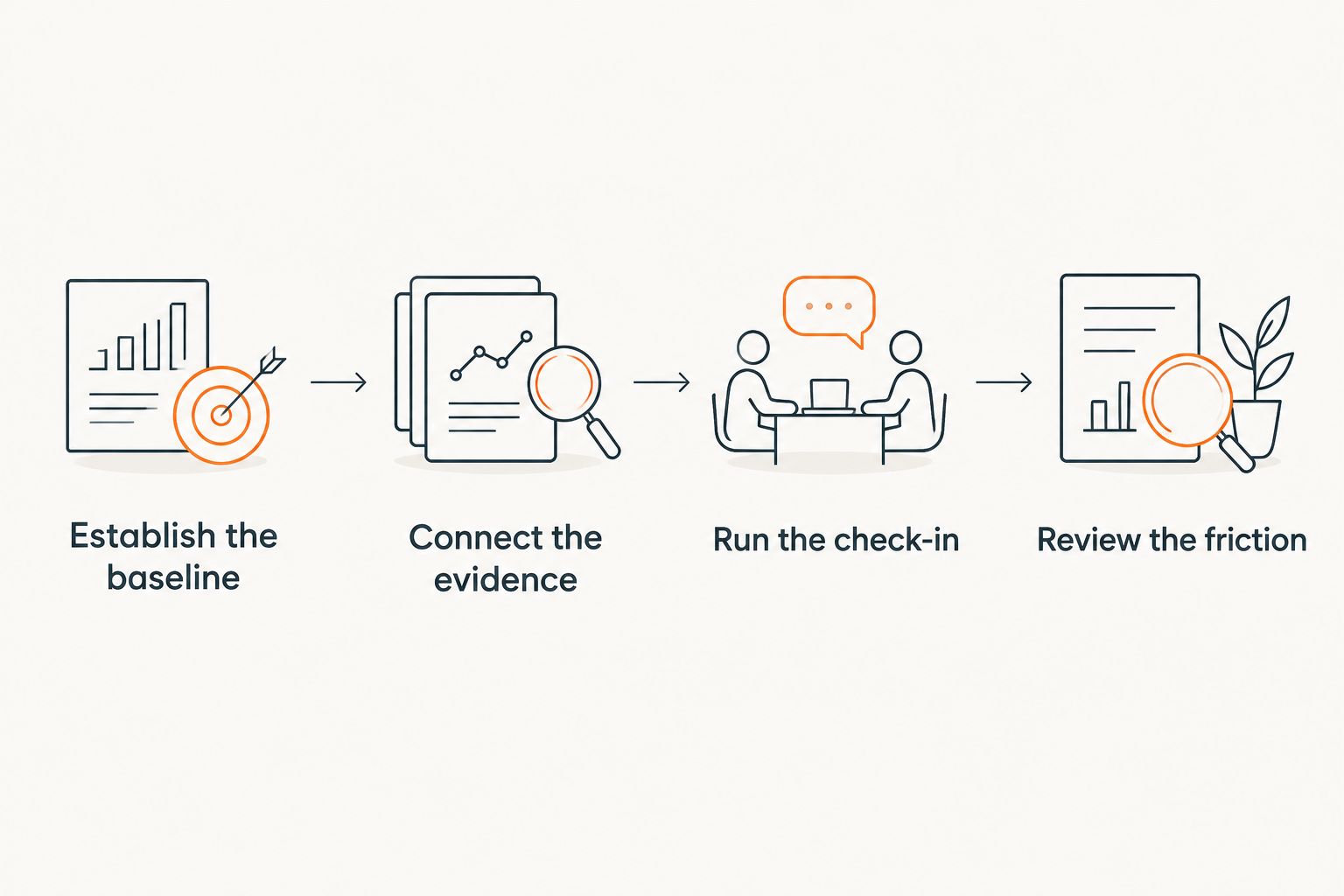
Establish the baseline
Record the current value, reporting period, source, and owner. Agree how the team will handle a disputed number before connecting it.
Connect the evidence
Demonstrate the source-to-destination movement. Ask the owner to explain where the value came from and when it last changed.
Run the check-in
Use the connected information in the actual discussion. Capture the next action and the support needed from leadership.
Review the friction
Discuss stale values, missed prompts, access problems, and duplicated work. Assign responsibility for each issue before expanding the workflow.
Expect a messy first OKR cycle, including results that need rewriting and a cadence that needs adjustment. The value compounds over several quarters as teams improve the discipline around the software.
How the ranking supports a purchasing decision
The ranking prioritizes outcome relevance, then participation, delivery context, planning context, and specialist handoffs. Each position maps to a distinct job and a limitation you can examine during a demonstration.
For OKR Leader, the same evaluation standard applies: demonstrate the required integration, inspect the resulting information, and use it in a real check-in. Cycle management and dashboards provide a place to manage the program; leadership still needs to resource the work.
Choose the connection your next check-in can use
The default starting point is a verified outcome-data connection. A team rebuilding participation can begin with a chat workflow and an explicit check-in routine.
Keep the initial scope small. Treat three objectives per team as a ceiling to examine, and give owners time to pursue the work already agreed.
Protect honest reporting by keeping OKR scores separate from pay decisions. An integration can move a value between systems; the surrounding incentives shape what people are prepared to report.
Related guides
One last thing
A deliberately stale value makes a useful demonstration test: ask the vendor what the owner sees and who receives the problem. That ordinary failure deserves a place in your 2026 evaluation.
Worth trying this week: bring one disputed number to the next check-in and trace it back to its owner together.
FAQ
What should I look for in OKR software ranked by integrations?
Start with the integration that supplies evidence for an active strategic result. Evaluate source definitions, update visibility, permissions, and failure handling through a demonstrated workflow.
Which OKR integration should a team evaluate first?
Evaluate an outcome-data connection first when the team already has an established check-in habit. A team rebuilding participation can begin by testing its chat-based preparation workflow.
Is Slack better than Microsoft Teams for OKR check-ins?
Use the communication system your team already uses for the relevant working conversation. Compare the specific OKR connector through a demonstration of reminders, updates, access, and escalation.
Can Jira task completion measure OKR success?
Jira task completion records delivery activity. An outcome-shaped Key Result needs its own evidence of the customer or business change the team is pursuing.
Does OKR Leader support every integration mentioned here?
Confirm each required connector and its behavior directly with OKR Leader. The platform provides integrations, cycle management, and dashboards; the workflow examples here are evaluation scenarios.
How long should an OKR integration pilot run?
Use two weekly check-ins as a proposed initial pilot, with one Key Result and an accountable source owner. Extend the evaluation when reporting intervals or unresolved failures require further observation.
Can integrations fix a failed OKR rollout?
Integrations address specific information handoffs and participation workflows. A restarting program also needs leadership support, protected working time, honest reporting, and a manageable set of objectives.